
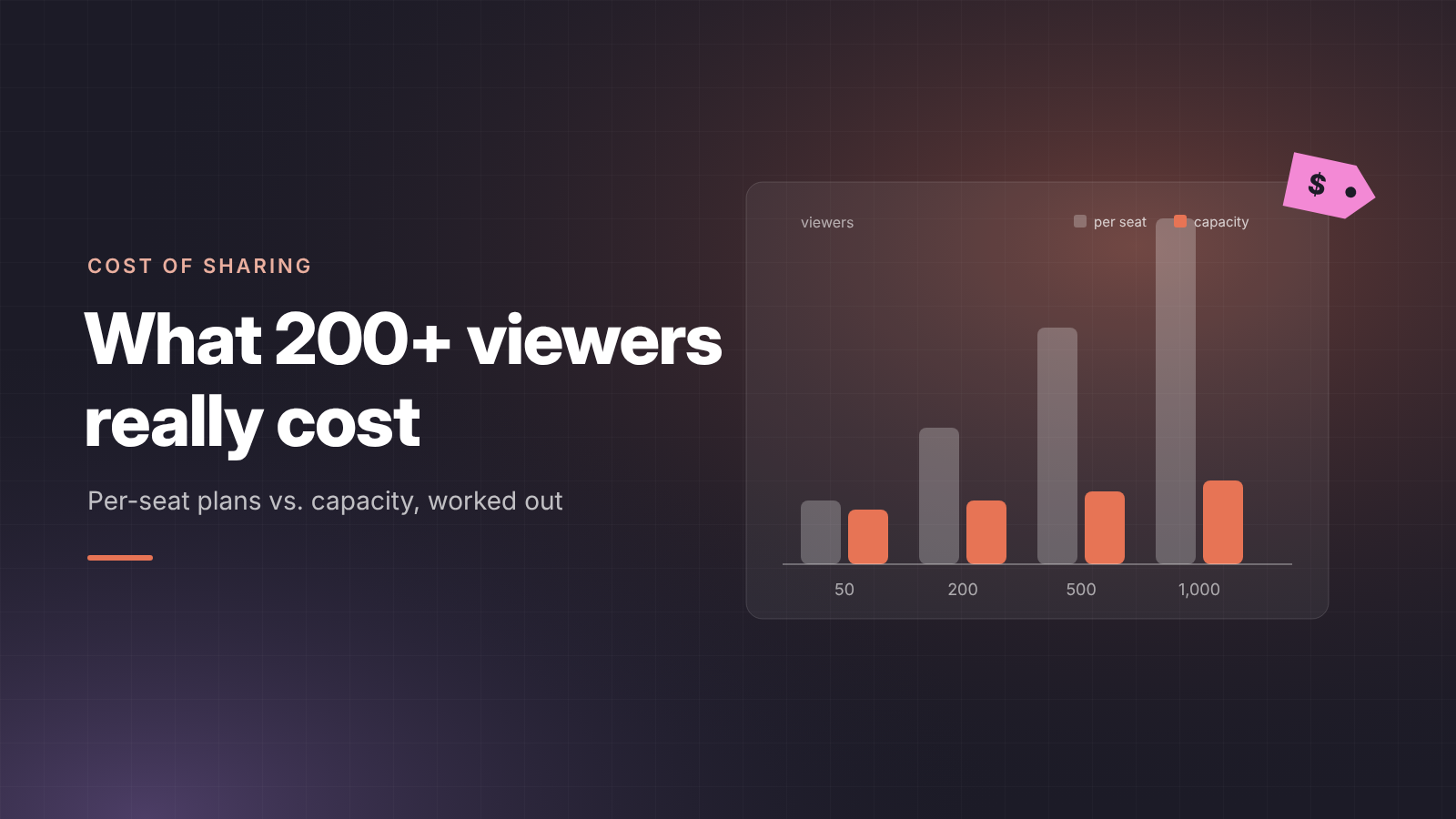
Short answer: building an AI dashboard is cheap. Showing it to a large audience is where the cost sits, because most AI and BI tools charge per viewer. At 200 viewers, a $20 seat per viewer adds up to about $4,000 a month. A capacity-based setup stays between roughly $800 and $1,600 a month whether you have 50 or 1,000 viewers.
- Claude and ChatGPT dashboards are shared with people who have an account; inside your organisation that usually means a paid seat.
- Power BI Pro costs $14 per viewer per month. Free viewers only start at Fabric F64, about $5,000 a month reserved.
- A portal on a small Fabric capacity with unlimited viewers is cheapest from about 50 viewers upward.
- Viewer licences are only part of the bill. Build time, maintenance and security reviews often cost more.
Why viewer cost is the hidden cost of AI dashboards
The person who builds a dashboard is one seat. The people who read it are tens or hundreds. Pricing pages show the builder's price, so the viewer bill only shows up at rollout.
AI tools make this sharper. A Claude dashboard can be opened only by people with a Claude account. Shared inside your organisation, every viewer is a member of your workspace, and Team plans bill per member. The same holds for ChatGPT workspaces. A sales director who checks one dashboard a week costs the same seat as an analyst who builds all day.
External viewers make it worse. Clients will not buy an AI subscription to see your report, and most per-seat plans do not have a cheap viewer-only tier.
Cost per option
List prices as of November 2026, per month, annual billing where offered. US-region Fabric prices; check your own region.
DataTako's capacity can be paused automatically when nobody uses it, so the pay-as-you-go figures above are an upper bound.
Worked example: 50, 200 and 1,000 viewers
Per-seat pricing grows in a straight line with the audience. Capacity-based pricing grows in steps. At 50 viewers the options are close; from about 200 viewers, a portal on a small capacity costs a fraction of seats or Pro licences.
Assumptions: Claude Team and ChatGPT Business both cost $20 per viewer per month, annual billing. Capacity for DataTako is sized F2 for 50, F4 for 200 and F8 for 1,000 viewers, running full-time; real sizing depends on how heavy the dashboards are, and auto-pause lowers it. Builders' own licences are left out of every option.
Costs people forget
Licences are the visible part. Other costs often decide which option is cheapest.
- Build and rebuild. A Claude dashboard that has to be rebuilt in Power BI for a large audience is built twice. Building on the semantic model from the start avoids that.
- Maintenance. A self-hosted or vibe-coded app needs updates, fixes and someone who understands the code. Budget hours per month, not a one-off.
- Security and compliance. Access reviews, a data processing agreement per tool, and a security test before clients get access. See AI dashboards and GDPR.
- Idle capacity. A Fabric capacity that runs 24/7 for a dashboard used during office hours wastes most of its cost. Pausing it outside working hours, as DataTako does automatically, cuts that.
How to choose
- Under 20 internal viewers who already have AI seats: share inside Claude or ChatGPT.
- 20 to 100 internal viewers: Power BI Pro or a portal; compare with the cost calculator.
- 100+ viewers or any external clients: a portal on capacity with unlimited viewers.
- 1,000+ internal viewers on one Microsoft tenant: Fabric F64 or a portal; F64 only pays off when it also runs your other workloads.
Run your own numbers with the Fabric capacity calculator before you commit. For the licensing background, read Power BI Embedded vs Pro vs Premium.
FAQ
Do viewers of a Claude dashboard need a paid plan? They need a Claude account. Shared inside your organisation, that means a seat in your Team or Enterprise workspace.
Is there a free viewer licence for Power BI? Only when the content sits on a Fabric F64 or larger capacity. Below that, viewers need Pro or Premium Per User.
How many viewers does DataTako allow? Unlimited on every plan. You pay for the platform and the Fabric or Power BI Embedded capacity, not per viewer.
Which Fabric capacity do I need for 1,000 viewers? It depends on how many people open dashboards at the same time and how heavy the queries are. Many start at F2 to F8 and scale up.
Are these prices final? No. They are list prices from November 2026 in USD for US regions, and vendors change them. Check current pricing before you budget.
Conclusion
The real cost of an AI dashboard is not building it but letting people see it. Per-seat pricing punishes a growing audience; capacity pricing does not. If your dashboard is heading for hundreds of viewers or external clients, compare DataTako's plans before you buy more seats.

