

Meet us at Data Expo 2026 — September 9–10, Jaarbeurs Utrecht →
Powered by Microsoft Fabric and Power BI Embedded

Power BI Report Hub

TL;DR: A Power BI report hub is a single, branded web portal that delivers your Power BI reports and dashboards to internal teams and external clients — without giving every viewer a Power BI Pro license. It runs on Microsoft Fabric / Power BI Embedded capacity, so you pay for compute, not per head, and viewers log in through your own branding instead of the Microsoft interface. DataTako is a Power BI report hub that connects to your existing workspace and goes live in hours — white-label, multi-tenant, and license-free for viewers.

What is a Power BI report hub?

A Power BI report hub is a portal layer that sits on top of Power BI and centralizes report delivery: one branded place where the right people see the right reports. Instead of sending links into the Power BI Service (where every viewer needs a Microsoft license and sees Microsoft's branding), a report hub embeds your reports in your own portal, on your own domain, secured by your own login.

The defining characteristics:

License-free for viewers — end users don't need a Power BI Pro or Microsoft account to view reports.

Branded (white-label) — your logo, colors, and domain; no Microsoft chrome.Multi-audience — internal teams and external clients, each seeing only their own data.

Capacity-based — it runs on Fabric / Power BI Embedded capacity, so cost is tied to compute, not viewer count.

It's the difference between building reports (Power BI does that) and distributing them (a report hub does that).
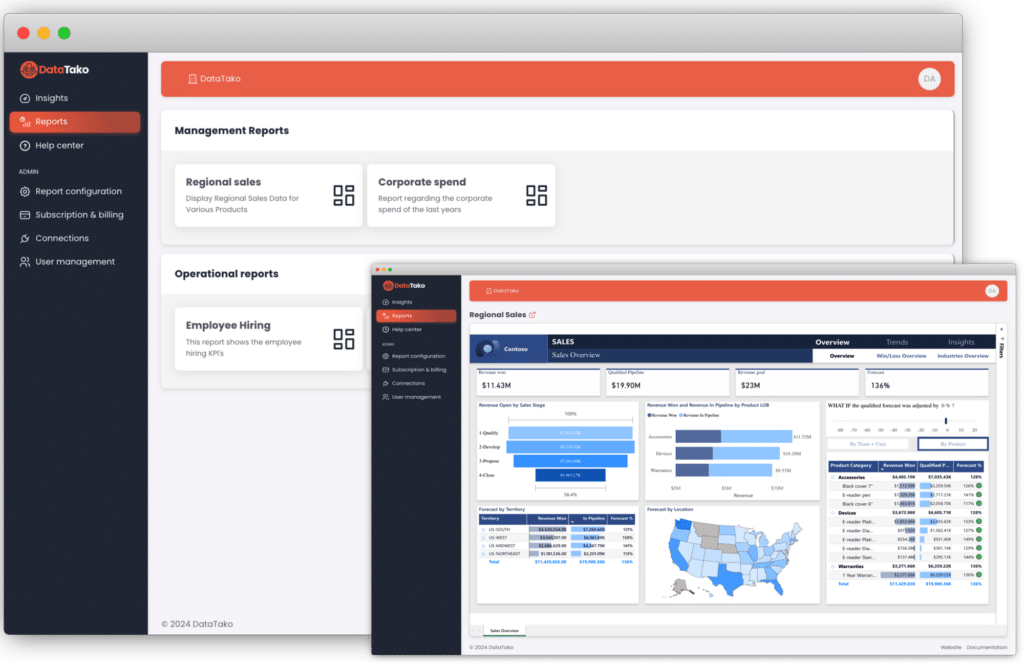
DataTako software dashboard with management and operational reports on regional sales, corporate spend, and employee hiring, featuring charts and a U.S. map.
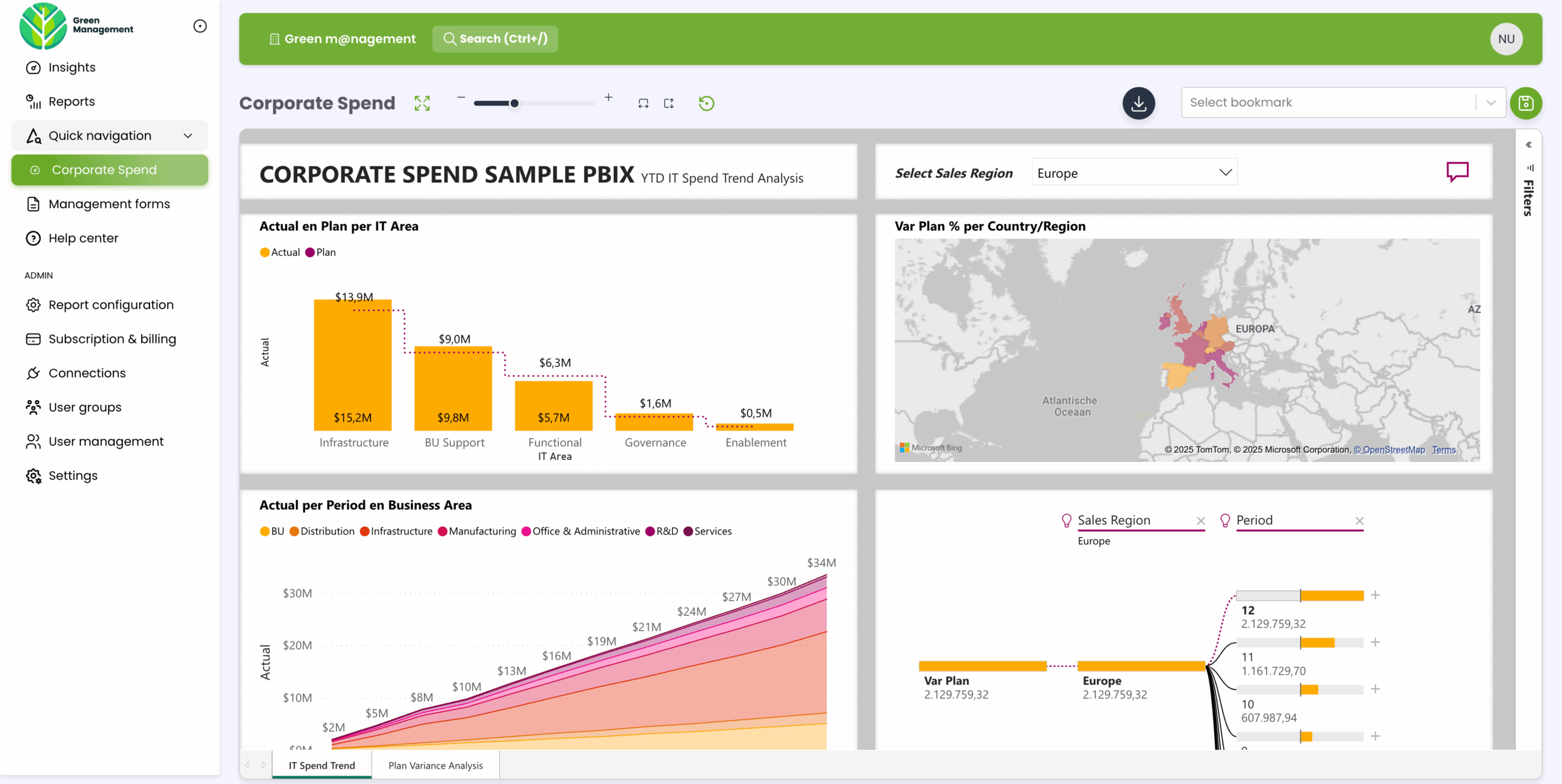
Dashboard showing corporate IT spend with bar charts, area chart, and a map of Europe highlighting sales regions and spending data.

Why teams move to a Power BI report hub

Most teams arrive here after hitting one of three walls:

The licensing wall. You can't realistically buy a Power BI Pro license for every external client. See sharing Power BI with external users without extra Pro licenses.

The cost wall. Per-user licensing scales linearly — every new viewer adds to the bill, forever. A capacity model flattens that. See Microsoft Fabric capacity explained.

The build wall. Power BI Embedded gives you embedding APIs — not a finished portal. Building the auth flow, white-label UI, multi-tenant separation, and user management yourself is months of engineering.

A report hub solves all three at once: license-free viewing, capacity-based cost, and a ready-made portal.

What to look for in a Power BI report hub

Not every "portal" is equal. The criteria that actually matter:

No per-viewer license — viewers authenticate against your identity system, not Microsoft's.

True white-label — your branding and your domain, end to end. (More on what real white-label means: white-label embedded analytics.)

Multi-tenant isolation with row-level security — each client sees only their data, enforced server-side. See multi-tenant analytics.

Enterprise SSO — SAML, Microsoft Entra, Google, with MFA.

Sub-organizations — run many isolated, separately branded client portals from one account. See sub-organizations.

Subscriptions, alerts, and writeback — so the hub is a working tool, not just a viewer.

Security posture — ideally the platform never accesses the underlying report data. See security and privacy.

AI / natural-language querying — the emerging differentiator: letting viewers ask their dashboards questions, not just read them.

Dashboard showing corporate IT spend with bar charts, area chart, and a map of Europe highlighting sales regions and spending data.

DataTako as your Power BI report hub

DataTako delivers each of the criteria above as configuration, not engineering:

Connect your existing Power BI workspace — no rebuilding reports.

Viewers log in through your branded portal on your domain, with no Power BI license.

Isolate clients with row-level security and sub-organizations; each portal separately branded.

Enterprise SSO, subscriptions, alerts, comments, writeback, and a REST API.

DataTako does not access your underlying report data — it proxies the embed token, which narrows your vendor-risk surface.

Typically live in hours, not months.

And it's getting an agentic AI layer — so your external portal viewers will be able to ask their dashboards questions in plain language, branded as yours, without a per-user license. (Background: what is agentic AI for analytics.)

See how DataTako works →

Power BI's Dashboards key advantages and capabilities

Easy-to-use interface

Drag-and-drop visual designer means business analysts can build reports without programming.

Versatile reporting

Same platform serves executive summaries, operational dashboards, paginated documents, and real-time monitoring.

Rich visualization library

~30 built-in visual types plus hundreds of custom visuals from the AppSource marketplace.

‍🌐

Deep Microsoft 365 and Azure integration

Native connections to Excel, SharePoint, Teams, Dynamics, Azure SQL, and dozens of other Microsoft services.

🧠‍

AI-powered insights

Copilot generates DAX from plain English. Smart Narratives auto-write descriptions of charts. Key Influencers identifies what drives a metric.

📱‍

Mobile accessibility

iOS and Android apps render reports responsively. Push notifications alert users when KPIs cross thresholds.

👥

Strong community

Active learning ecosystem — official docs, blogs, YouTube, Reddit, certifications, in-person user groups.

Continuous Microsoft innovation

Monthly updates with features that competitors take years to match.

🏢‍

Enterprise-grade scalability

Premium and Fabric capacities handle multi-terabyte datasets and thousands of concurrent users.

FAQ

What is a Power BI report hub?A branded web portal that delivers your Power BI reports to internal and external users without a per-viewer Power BI license. It runs on Fabric / Power BI Embedded capacity and replaces the Microsoft-branded sharing experience with your own.

Do users need a Power BI license to use a report hub?No. Viewers authenticate against your identity system and view reports without a Power BI Pro license or Microsoft account. Only the people who build reports need a Pro license.

How is a Power BI report hub different from Power BI Embedded?Power BI Embedded is the underlying technology — embedding APIs. A report hub is the finished product built on top: the branded portal, authentication, multi-tenant isolation, and user management, ready to use.

Can a Power BI report hub run on our own domain and branding?Yes. A true white-label report hub uses your logo, colors, and domain end to end, with no Microsoft branding visible to viewers.

Is a Power BI report hub secure for multiple clients?When it enforces row-level security and tenant isolation, each client sees only their own data. Stronger platforms also avoid accessing the underlying report data at all.

How fast can we launch a Power BI report hub?With a platform like DataTako, hours — you connect an existing Power BI workspace, set branding and access rules, and invite viewers. Building one yourself on Power BI Embedded typically takes weeks to months.