
Usually yes, if the AI queries the semantic model as the right person. Row-level security lives in the Power BI semantic model, so any AI that queries the model under the viewer's own identity inherits the filter. The risk is identity: in a multi-tenant client portal, viewers don't sign in to your Microsoft tenant, so the question to ask any vendor is which identity the AI runs as. Also ask what happens to an answer once it's cached, exported or summarised.
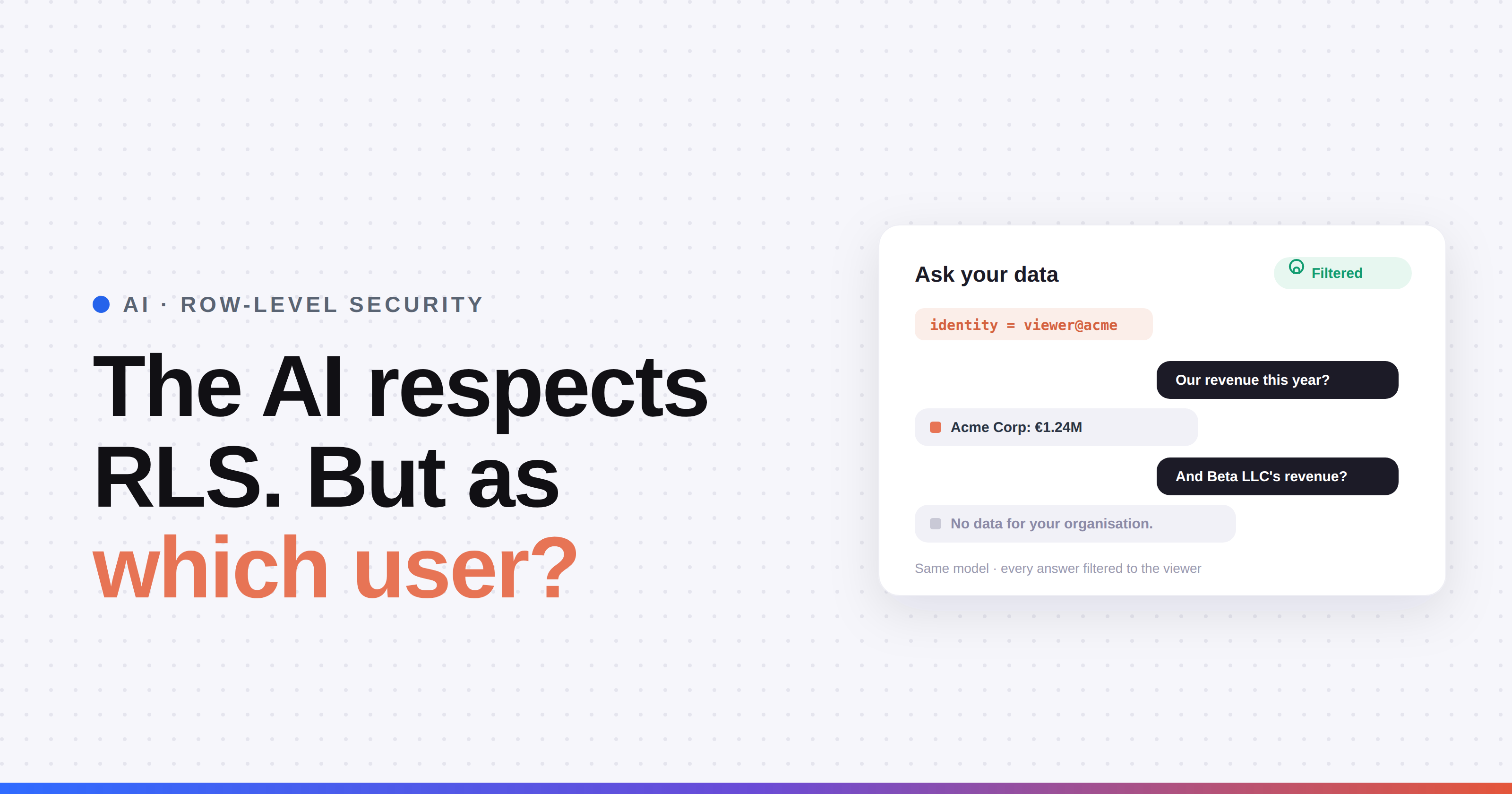
Every AI feature Microsoft announced at FabCon Barcelona comes with the same promise: it respects row-level security, because it runs as the signed-in user. That's true, and it's the right design. It also hides a question. RLS filters on an identity. In a client portal, most of your viewers don't have an identity in your tenant. So which identity does the AI run as, and what happens to the filter after the answer leaves the model? That's where client data leaks between clients, not in the DAX. Here's how RLS actually works with AI, where it breaks, and how to test it yourself, on any vendor, in about ten minutes.
TL;DR
- RLS is enforced by the semantic model, not by the report or the AI. Anything that queries the model as the viewer gets filtered.
- Microsoft's AI runs as the signed-in Entra user. Fabric IQ in Copilot Chat, Cowork, Fabric IQ MCP and Fabric Data Agents all say so. Your external viewers aren't signed-in Entra users.
- Service principals bypass RLS unless an effective identity is passed. Microsoft: RLS "isn't applied for apps using a service principal as the final effective identity."
- Workspace Admins, Members and Contributors aren't filtered by RLS at all. Only Viewers are.
- Most leaks happen outside the query: tables without a tenant key, cached answers, chat history, exports, and AI indexes built outside the model.
- Run the ten-minute test below on every vendor, including us.
How does row-level security work with AI?
RLS is defined in the semantic model as a role with a DAX filter. When a query runs, Power BI resolves who's asking, applies that person's roles and only returns the rows they're allowed to see. The report doesn't do the filtering. Neither does the AI. The model does.
That's good news for AI. An AI feature that queries the model has to go through the same filter as a visual does. It can't see rows the model doesn't return. So the easy half of the question, "does the AI respect RLS?", is almost always yes.
The hard half is the input to that filter: who does the model think is asking?
Which identity do Microsoft's AI features run as?
Microsoft's documentation is consistent here. Every Fabric IQ surface runs as the signed-in user:
For internal users that's exactly right. For client portals it means none of these surfaces has an identity for your external viewer to run as. That's why they don't reach clients. See Fabric IQ in Copilot: can your clients use it? and Fabric IQ MCP for client reporting.
What identity does a client portal use?
Client portals use app-owns-data embedding. Your application talks to Power BI as a service principal and generates an embed token per viewer. That token carries an effective identity: a username and the RLS roles to apply. Power BI then filters as if that viewer were asking. (Full setup in our dynamic RLS step-by-step guide.)
The detail that matters for AI: the service principal on its own is not filtered. Microsoft states that service principals can't be added to an RLS role, and "RLS isn't applied for apps using a service principal as the final effective identity." Under a service principal without an effective identity, USERPRINCIPALNAME() returns the app ID or an empty string, not your viewer.
So for a portal AI there are two very different designs:
- The AI queries under the viewer's effective identity. The model filters every query to that viewer. RLS is doing its job.
- The AI queries as the service principal (or one shared account) and the vendor filters the results afterwards in their own code. Now RLS isn't protecting you. The vendor's code is.
Both can be marketed as "respects RLS". Only the first one is RLS.
Where does AI break row-level security in practice?
Almost never in the DAX filter itself. Usually around it.
- Tables without a tenant key. RLS only filters tables it can reach. A fact table with no relationship to your security table, or a dimension that holds client names, comes back unfiltered. A visual might never show it. An AI that reads the schema and writes its own DAX will find it.
- Workspace roles. RLS applies to Viewers only. If the identity the AI uses is an Admin, Member or Contributor of the workspace, there's no filter at all.
- Identity mismatches. The username in the embed token has to match your security table exactly. A mismatch usually returns nothing, which looks safe. A sloppy fallback role that returns everything doesn't.
- Answers that outlive the query. Chat history, cached answers, "share this answer" links, scheduled summaries and exports are copies of filtered data. If they're stored or shown per organisation instead of per viewer, a user can see another user's answer.
- AI indexes built outside the model. Some AI features copy data into their own vector store or search index to answer faster. RLS in the semantic model doesn't protect a copy. Ask where the AI reads from.
- Testing blind spots. Microsoft notes that "Test as role" in Power BI can't validate Copilot. Your normal RLS test doesn't prove the AI is safe.
For the multi-tenant patterns behind all this, see Power BI Embedded with RLS: multi-tenant SaaS patterns and can clients see each other's data in Power BI?.
How do you test whether a portal's AI respects RLS?
Ten minutes, two test users, no inside knowledge needed. Works on any vendor.
- Set up two viewers in two different client organisations, A and B, each with some data only they should see.
- As viewer A, ask for totals. "What's our total revenue this year?" Note the number and check it against A's report.
- As viewer A, ask for B by name. "What's revenue for [client B]?" The only correct answer is no data or "I can't find that". A polite refusal that still mentions B's figures is a fail.
- Ask a question that needs every row. "Rank all clients by revenue" or "How many customers do we have in total?" A correct answer only covers A.
- Ask about the schema. "Which tables and columns can you see?" Look for tables that shouldn't be there, like a client list.
- Ask something that needs an unfiltered table. If a table has no tenant key, a question aimed at it shows whether it leaks.
- Log in as viewer B and open the chat history. A's questions and answers must not be visible.
- Export or share an answer as A and open the link or file as B. It should fail or show nothing.
- Ask B's questions as A after B has asked them. If A gets B's cached answers, caching is per organisation or global, not per viewer.
- Ask the vendor two questions in writing: which identity does the AI query the semantic model as, and does it store or index data outside the model?
If a vendor can't answer step 10 clearly, that's your answer.
How do the options compare on RLS?
How does DataTako's AI answer step 10?
Since we're asking every vendor, here are our own answers in writing:
- Where does the AI query? Directly on the semantic model, with the viewer's row-level security applied. No separate copy of the data.
- Is chat history shared? No. It's stored per user, so viewer B never sees viewer A's questions or answers, even inside the same client organisation.
- Is client data stored outside the model? No. We don't store client data in a separate index or database for the AI.
What does our own AI not do?
Fair's fair. Our agentic AI inherits your semantic model's security, and that cuts both ways. If a table in your model has no tenant key, the AI can see it for every viewer, same as any other query would. We can't fix a leaky model from the AI layer, and we'd rather tell you that than promise otherwise. Check your model first: our RLS implementation guide covers the basics. And the answers are only as fresh as the last refresh of the model.
Run the ten-minute test on us too. A test that only a vendor's own product passes isn't a test.
Frequently asked questions
Does Power BI Copilot respect row-level security?
Yes. Copilot and Fabric IQ in Microsoft 365 Copilot Chat use the signed-in user's existing permissions, including row-level and object-level security, so answers only include data that user can see. RLS only applies to users with the Viewer role, and Microsoft notes that the "Test as role" feature can't validate Copilot.
Does AI in an embedded Power BI portal respect RLS?
Only if the AI queries the semantic model under each viewer's effective identity. Portals embed with a service principal, and Microsoft states RLS isn't applied when a service principal is the final effective identity. If the AI queries as the service principal and filters results afterwards, RLS isn't what's protecting the data.
Can an AI chatbot leak data between clients?
Yes, usually outside the query itself. Common causes are tables without a tenant key that RLS can't filter, chat history or cached answers shared across viewers, exported or shared answers, and AI indexes that copy data outside the semantic model. Testing with two viewers from different organisations catches most of these.
Do workspace admins bypass row-level security?
Yes. Power BI RLS only restricts users with the Viewer role. Workspace Admins, Members and Contributors see all data. If an AI feature queries as an identity with one of those roles, no RLS filter is applied.
How do I test if a portal's AI respects RLS?
Use two viewers from different client organisations. Ask each for totals, for the other client's data by name, for rankings across all clients and for the schema. Then check chat history, shared answers and caching across the two accounts. Finally, ask the vendor in writing which identity the AI queries as and whether data is stored outside the model.
How does DataTako's AI handle row-level security?
DataTako's agentic AI queries the Power BI semantic model directly, with the viewer's row-level security applied, so answers only include that viewer's data. Chat history is stored per user, and client data isn't stored in a separate index or database outside the model.
Does Fabric IQ work for external users in a client portal?
No. Fabric IQ in Copilot Chat, Cowork and Fabric IQ MCP all run as a signed-in Microsoft Entra user in your tenant. External portal viewers don't have that identity, and Copilot Chat also requires a Microsoft 365 Copilot licence per user.

