
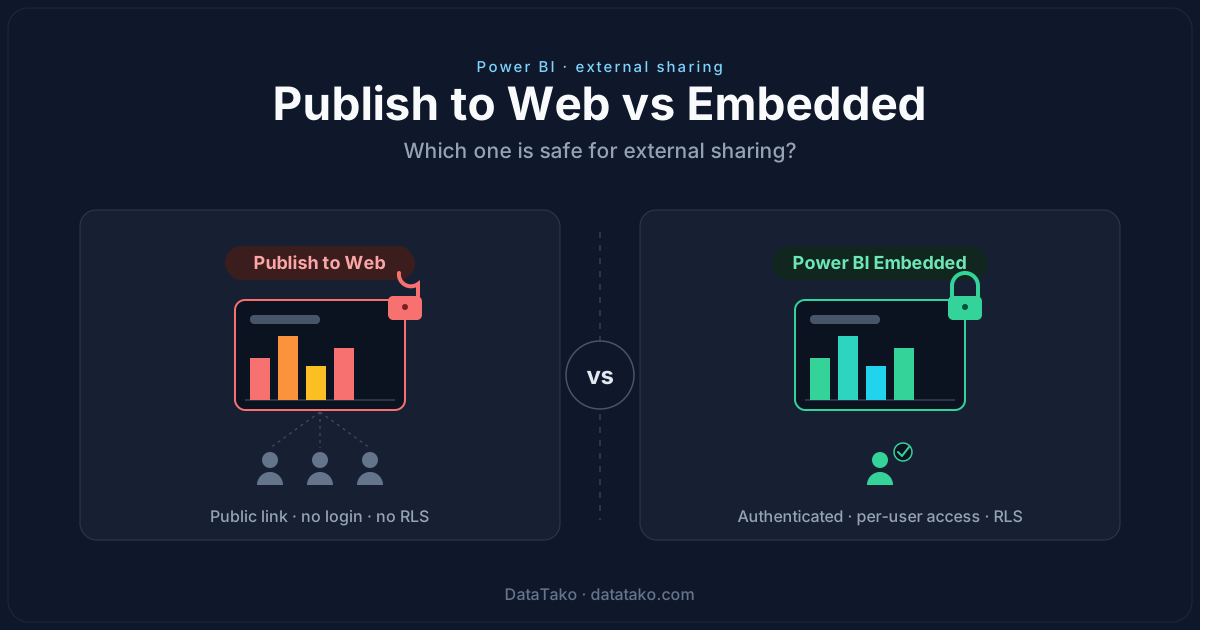
Both Publish to Web and Power BI Embedded let you show a report to someone outside your organization. That is where the similarity ends. One puts your data on the open internet for anyone to find. The other keeps it behind authentication, with row-level security and a full audit trail.
Most teams reach for Publish to Web because it is free and takes thirty seconds to set up. Very few of them realize that "free" can mean their numbers end up cached on a public URL — and indexed by Google. This guide lays out the real difference, so you can pick the right one before you share anything you'll regret.
TL;DR
Use Publish to Web only for data that is genuinely meant for the whole world: marketing dashboards, open data, public KPIs. Use Power BI Embedded the moment clients, logins, or sensitive data are involved. Publish to Web has no authentication and no row-level security; Embedded has both. As of 2026, Microsoft even blocks new Publish to Web embed codes by default.
What is Publish to Web?
Publish to Web is a free Power BI feature that turns a report into a public web page. You generate an embed code or link, drop it into a website or share it directly, and anyone who has the URL can open the report — no sign-in, no Microsoft account, nothing.
It was built for one job: publishing reports that are meant to be fully public. Think a press dashboard, an open-data visualization, or a KPI page on a marketing site. Within that narrow lane it works well and costs nothing.
The problem is that it gets used far outside that lane — to send a client "just a quick link" — and that is where the risk starts.
What is Power BI Embedded?
Power BI Embedded lets you put Power BI reports inside your own application or portal, with your own authentication controlling who sees what. Instead of a public link, your app requests a short-lived embed token from Power BI and renders the report only for the user it has already verified.
It runs on dedicated Fabric capacity (the F SKUs, or the older Power BI Embedded A SKUs bought through Azure), which is why it is a paid model rather than a free one.
There are two patterns:
- App owns data — your app authenticates users and shows them reports through a single service identity. This is how you serve external clients who don't have Power BI licenses.
- User owns data — each viewer signs in with their own Power BI account. This suits internal users who are already licensed.
For external sharing, app owns data is almost always the right model.
The four differences that actually matter
A feature table is easy to skim past. These are the differences that decide whether your data stays private.
1. Security: public and unauthenticated vs token-based
With Publish to Web there is no front door. The link works for anyone who has it, and links get forwarded, pasted into emails, and saved in browser histories. There is no way to revoke access for one person — you can only kill the embed code for everyone.
Embedded flips this around. Nobody sees a report until your application has authenticated them and requested a token scoped to exactly what they're allowed to see. Access is yours to grant and revoke, per user.
2. Row-Level Security: why Publish to Web ignores it
If your report relies on row-level security to show each client only their own rows, Publish to Web is a non-starter — it does not support reports that use RLS at all. There is no concept of "who is viewing" on a public link, so per-user filtering is impossible by design.
Embedded passes the viewer's identity through to the dataset, so RLS works exactly as intended. This is the difference between every client seeing their own data and every client seeing everyone's data.
3. Control and compliance: no audit trail vs full logging
Publish to Web gives you no record of who opened a report, when, or from where. For anything touching regulated or contractual data — financial reporting, HR data, client deliverables — that absence of an audit trail is usually a dealbreaker on its own. (We go deeper on this in our guide on sharing Power BI reports compliantly.)
Embedded logs access and usage, which is what auditors, security teams, and your own GDPR obligations expect to see.
4. Cost vs risk: "free" gets expensive when data leaks
Publish to Web's only advantage is price. But the real cost of a public link isn't zero — it's the expected cost of an exposure: a leaked client report, an indexed dashboard, a breach disclosure. Embedded carries a capacity cost, but it buys you the controls that keep that exposure off the table. Weigh the licence fee against what a single leak would cost you in trust and remediation.
The 2026 news: Microsoft now blocks Publish to Web by default
Microsoft has tightened Publish to Web significantly. New embed codes are now blocked by default — admins have to explicitly allow it, and even then only for approved groups configured in the Admin Portal. Existing codes keep working, but generating new ones is no longer a free-for-all.
Read that as a signal: Microsoft itself is steering people away from Publish to Web as a sharing mechanism. If you're hitting that block right now, it's the right moment to move to a model built for external sharing rather than working around the restriction.
When should you use which?
A simple rule of thumb:
- Use Publish to Web when the data is genuinely public and you'd be comfortable seeing it on the front page of a newspaper — marketing metrics, open data, public-facing KPIs.
- Use Power BI Embedded the moment there are clients, logins, segmentation, or any data you wouldn't want indexed by a search engine.
If you have to stop and think about whether the data is sensitive, that hesitation is your answer: don't use Publish to Web.
Where DataTako fits
Embedded gives you the security and control — but it also asks you to manage Fabric capacity, build the embedding app, handle tokens, and wire up authentication and RLS. That's real engineering work before you can share a single report.
DataTako delivers that Embedded layer ready-made. You connect your Power BI workspace and share reports with external users through a secure, white-label portal — no guest accounts, no public links, no capacity management on your side. You get the safety of Embedded without building it yourself.
FAQ
Is Power BI Publish to Web safe? Not for anything private. It makes reports publicly accessible with no authentication and no row-level security, and the pages can be indexed by search engines. It's only safe for data you intend to be fully public.
Does row-level security work with Publish to Web? No. Publish to Web does not support reports that use RLS, because there is no signed-in viewer to filter against. For per-user filtering you need Embedded.
Can I disable Publish to Web in my tenant? Yes. Power BI admins can restrict or disable it in the Admin Portal, and as of 2026 new embed codes are blocked by default. You can scope who's allowed to create them.
What does Power BI Embedded cost? Embedded runs on dedicated capacity (Fabric F SKUs or Power BI Embedded A SKUs), billed by capacity size. The right SKU depends on your usage — see our Fabric capacity guide for sizing.

