
Not to an external client, no. At FabCon Barcelona, Microsoft announced a new app building experience in Power BI Desktop, powered by Fabric Apps, for Pro, Premium Per User and Fabric capacity customers. Pro and PPU users get Fabric Apps and Fabric Database at no extra cost, up to 1 GB per app. But deployed Fabric Apps sign users in with Microsoft Entra ID, for people with access to your Fabric workspace. That makes them an app builder for your organisation, not a portal for your clients.
Microsoft just told every Power BI Pro user they're an app developer now. Describe an app in plain language, and Power BI Desktop builds it on Fabric, with write-back and a database included, up to 1 GB, at no extra cost. That's a real shift. Before you promise one to a client, check who can log in. Deployed Fabric Apps use Entra ID sign-in, for people with access to your workspace. We wrote in June that this would be the catch. It still is. Here's what Power BI apps are, which of the three things called "Power BI apps" you're looking at, and when you still need a portal.
TL;DR
- Announced: agentic app building in Power BI Desktop, powered by Fabric Apps. Preview "in the coming weeks" for Pro, PPU and Fabric capacity customers.
- Included for Pro and PPU: Fabric Apps and Fabric Database, no extra cost, up to 1 GB per app.
- What the apps can do: accept inputs, write back data, keep shared state and support operational workflows. Much more than a report.
- Who can open one: users who sign in with Entra ID and have access to your Fabric workspace. No app-owns-data, no anonymous access, no custom sign-in.
- "Power BI apps" now means three things: workspace apps, org apps and these new Fabric-powered apps. None of them is built for external clients without guest accounts.
- For clients outside your tenant, you still need embedding or a client portal.
What did Microsoft announce?
Two announcements at FabCon Barcelona (September 2026) belong together:
- A new app building experience in Power BI Desktop. In Microsoft's words, it's "powered by apps in Fabric" and uses natural language to create data applications that "accept inputs, write back data, preserve shared state, and support operational workflows." Preview is expected "in the coming weeks", for Power BI Pro, Premium Per User and Fabric capacity customers, at no additional cost.
- Fabric Apps and Fabric Database for Pro and PPU. Pro and PPU customers get access to both, "up to 1 GB per app". Fabric Apps itself also gained TypeScript backend functions, a Secret Store, PostgreSQL support, private-by-default access and built-in usage metrics.
A note on status, because the sources disagree: Microsoft's Azure blog calls Fabric Apps generally available since June 2026, while the Fabric Apps page on Microsoft Learn (updated 29 September) still labels it preview and requires a Fabric capacity and an admin tenant setting. The Pro and PPU experience isn't documented yet. Treat it as announced, not available, until Learn catches up.
What is a Fabric App?
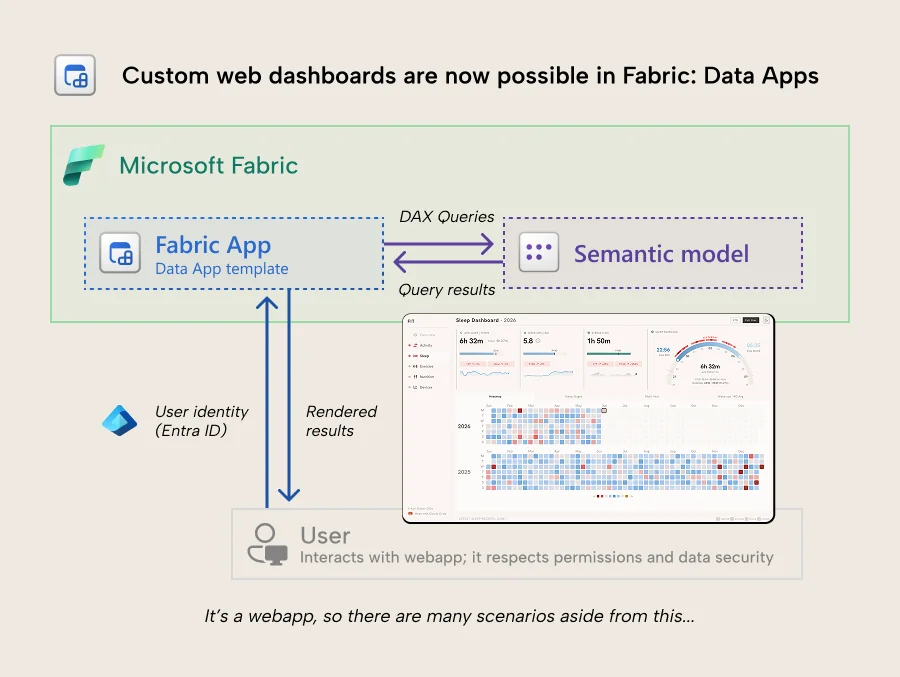
A Fabric App is a Fabric item for building and hosting a web application inside Fabric. There are two templates. The operational template provisions a managed database and generates APIs from your data model. The analytical "data app" template connects to a published semantic model and queries it with DAX, the same way a Power BI report does under the hood.
The difference is everything around the query. There's no canvas and no visual gallery. An app is source code: React and TypeScript for the front end, Vega-Lite or D3.js for visuals, a DAX query per visual. You scaffold it with Microsoft's Rayfin CLI and deploy with one command. Fabric hosts it, brokers sign-in through Entra ID and enforces the semantic model's row-level security on every query.
Microsoft's expected workflow is that most people won't write this code themselves. The new Power BI Desktop experience makes that explicit: you describe the app, an AI agent builds it. Kurt Buhler of Tabular Editor summed up the difference in June: "if a Power BI report is Lego, then a data app is a 3D printer."
Which "Power BI app" are you looking at?
The name is now doing a lot of work. Three different things are called Power BI apps:
- Workspace apps. The classic way to package reports for consumers. One app per workspace, with up to 25 audience groups so different people see different content.
- Org apps. A newer Fabric item type, generally available, that lets you create multiple apps per workspace. An org app can bundle Power BI reports, paginated reports, notebooks, real-time dashboards and Fabric Apps. Microsoft describes them as packaging content "for consumers in their organization".
- Power BI apps built with Fabric Apps. The new AI-built data applications from Barcelona. These are custom web apps, not a way of packaging reports.
The first two are distribution. The third is a new kind of content. When someone in your team says "let's just give the client a Power BI app", ask which one they mean.
Who can open a Power BI app?
Fabric Apps. Deployed apps authenticate through Fabric SSO with Microsoft Entra ID, "for any user with access to your Fabric workspace". Local email and password sign-in only exists for development, and turning authentication off makes deployment fail. Access is managed with item permissions: run and interact (the default for workspace members), edit, and reshare.
Workspace apps. Microsoft documents that you can distribute an app to external users, who get an email with a link. They're B2B guests in your Entra ID. Outside Premium or F64+ capacity, "all business users need Power BI Pro or Premium Per User (PPU) licenses to view your app." Guests can't install apps published to the entire organisation.
Org apps. The documentation talks about sharing "with others in your organization" and doesn't address guest users.
So all three routes to a client run through the same place: a guest account in your tenant, and a Power BI licence per viewer unless you're on F64 or larger.
What does that mean for external clients?
It means the old question is back: do you want to manage your clients as users in your tenant?
- Onboarding. Every client contact needs a B2B invite and has to accept it before an app shows up for them.
- Licences. Below F64, every viewer needs Pro ($14 per user per month) or PPU ($24). For 50 client contacts, that's $700 a month for Pro alone.
- Branding. Guests sign in through Microsoft and see Microsoft's interface. It's your data in someone else's product.
- Admin and risk. You own offboarding, conditional access and the risk of a guest seeing a workspace they shouldn't.
- Isolation. Fabric Apps enforce RLS on the user's own Entra identity. That works, but it only works for users who have one.
For a handful of partners who already live in Microsoft 365, guest access can be fine. For client reporting at scale, it's the wall portals exist to remove. More on the trade-offs in Power BI guest user access: pros, cons and alternatives.
Does this replace Power BI Embedded?
For internal use, it competes with it. A bespoke operational app for a department, with write-back, used to mean Power BI Embedded or a custom-built web app. Now it's a prompt in Power BI Desktop and a Pro licence. That's a big deal and we'd use it.
For external use, no. Power BI Embedded's app-owns-data model serves viewers who have no account in your tenant, with RLS through an effective identity in the embed token. Fabric Apps has no equivalent. (Background: the complete Power BI Embedded guide.)
What about the licensing question from June?
In June we asked the question nobody had answered: does a free user on a small F SKU need a Pro licence to open a Fabric App, the way they would for a Power BI report? Barcelona half-answered it for creators: Pro and PPU users get Fabric Apps and Fabric Database at no extra cost, capped at 1 GB per app. What a viewer needs to open one still isn't documented. Until it is, test it in your own tenant before you build a plan on it. We'll update this post when Microsoft documents it.
When is a Power BI app the right answer, and when is a portal?
- Internal users, custom workflow or write-back needed? Build a Power BI app with Fabric Apps. That's exactly what it's for.
- Internal users, standard reports? A workspace app or an org app is simpler.
- A few external partners who already use Microsoft 365? Guest access to a workspace app can work. Budget for the licences and the admin.
- Many external clients, your branding, no Microsoft accounts? You need embedding. A white-label client portal gives you that without building it yourself. See also how a report hub compares to apps and workspaces and 4 ways to share Power BI reports with external users.
Frequently asked questions
What are the new Power BI apps announced at FabCon 2026?
A new app building experience in Power BI Desktop, powered by Fabric Apps. You describe an app in natural language and an AI agent builds a data application that can accept inputs, write back data and support workflows. Microsoft announced a preview in the coming weeks for Pro, Premium Per User and Fabric capacity customers, at no additional cost.
Can external users access a Fabric App?
Not without an account in your tenant. Deployed Fabric Apps authenticate through Fabric SSO with Microsoft Entra ID, for users with access to your Fabric workspace. There's no app-owns-data option, no anonymous access and no custom sign-in provider, so external clients would need guest accounts.
Do Power BI Pro users get Fabric Apps for free?
Microsoft announced that Power BI Pro and Premium Per User customers get Fabric Apps and Fabric Database capabilities at no additional cost, up to 1 GB per app. As of 30 September 2026 the Learn documentation still requires a Fabric capacity and a tenant setting, so check the current documentation before relying on it.
What's the difference between workspace apps, org apps and Fabric Apps?
Workspace apps package reports for consumers, one app per workspace with up to 25 audience groups. Org apps are a newer item type that allows multiple apps per workspace and can bundle reports, notebooks and Fabric Apps. Fabric Apps are custom web applications built on Fabric, which the new Power BI app building experience creates.
Can I share a Power BI org app with external users?
Microsoft's org app documentation only describes sharing within your organisation and doesn't address guest users. Workspace apps can be distributed to B2B guests, who need Power BI Pro or PPU unless the content is on Premium or F64+ capacity. Guests can't install apps published to the entire organisation.
Do I still need Power BI Embedded or a client portal?
For external clients, yes. Fabric Apps and Power BI apps require Entra ID sign-in in your tenant. Power BI Embedded with app-owns-data serves viewers without a Microsoft account, filtered by row-level security through an effective identity, which is what client portals are built on.

