

Looking for the comprehensive Fabric capacity guide? See our updated 2026 Microsoft Fabric capacity guide — SKU pricing table from F2 to F2048, decision tree, F64 threshold, PAYG vs reserved maths, and a 12-question FAQ.
Introduction to Microsoft Fabric Capacity
Microsoft Fabric is a unified analytics platform designed for professionals who manage data engineering, data science, real-time analytics, and business intelligence at scale. At the core of this platform lies Microsoft Fabric capacity, a shared compute model that determines how workloads run, scale, and perform.
For professionals, understanding Microsoft Fabric capacity is essential for:
- Predictable performance
- Cost control
- Efficient workload planning
- Avoiding throttling and performance bottlenecks
This article answers the most common professional questions:
- What is Microsoft Fabric capacity?
- What is Microsoft Fabric test capacity?
- How do you estimate Microsoft Fabric capacity accurately?
What Is Microsoft Fabric Capacity?
Microsoft Fabric capacity is the core compute and resource model that powers workloads across the Microsoft Fabric platform. For professionals working with analytics, data engineering, business intelligence, and AI, understanding Microsoft Fabric capacity is critical to performance, cost control, and scalability.
At its core, Microsoft Fabric capacity defines how much processing power, memory, and concurrency your organization can use at any given time. Instead of managing separate capacities for Power BI, data pipelines, and analytics engines, Microsoft Fabric brings everything together under one unified capacity model.
Built by Microsoft, Fabric capacity supports multiple workloads at once, including:
- Data Engineering
- Data Warehousing
- Data Science
- Real-Time Analytics
- Power BI workloads
Instead of provisioning separate resources for each service, Fabric uses a capacity-based model where multiple workloads share the same compute allocation.
Key Characteristics of Microsoft Fabric Capacity
- Measured in Capacity Units (CUs)
- Shared across all Fabric workloads
- Supports bursting for short-term spikes
- Enforced through throttling when limits are exceeded
This design allows organizations to centralize analytics compute while maintaining governance and performance predictability.
Understanding Capacity Units (CUs)
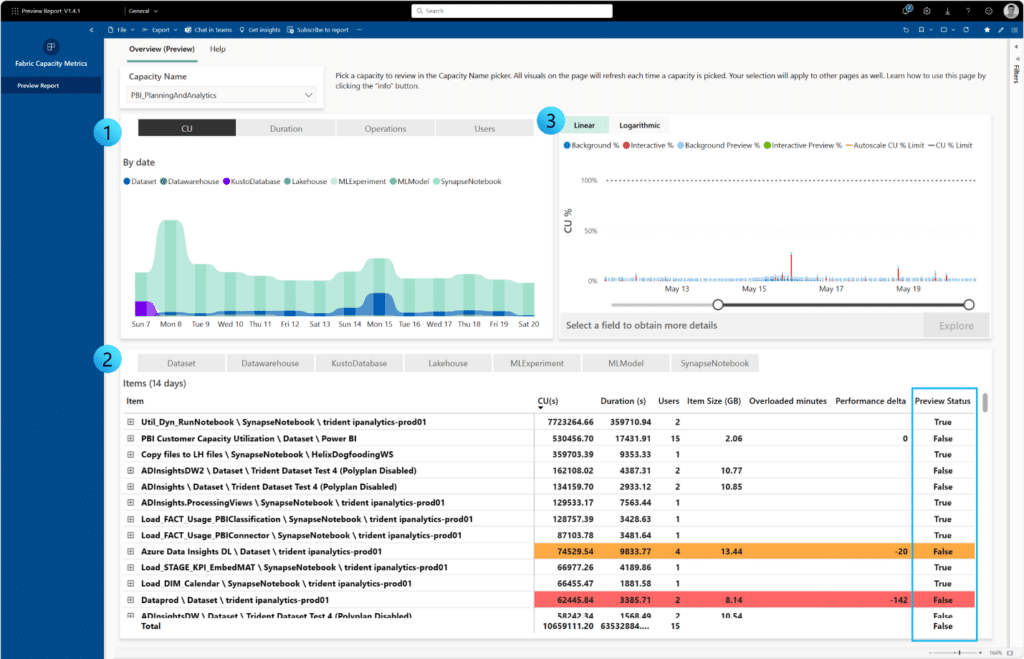
Capacity Units (CUs) represent the normalized measure of compute power in Microsoft Fabric. Each Fabric operation—such as running a Spark job, refreshing a dataset, or querying a warehouse—consumes CUs.
Important CU Concepts
- CUs are consumed per second
- Different workloads consume CUs differently
- High concurrency increases CU consumption
- Sustained overuse leads to throttling
Professionals should treat CUs as a shared performance budget rather than fixed CPU cores.
What Is the Microsoft Fabric Test Capacity?
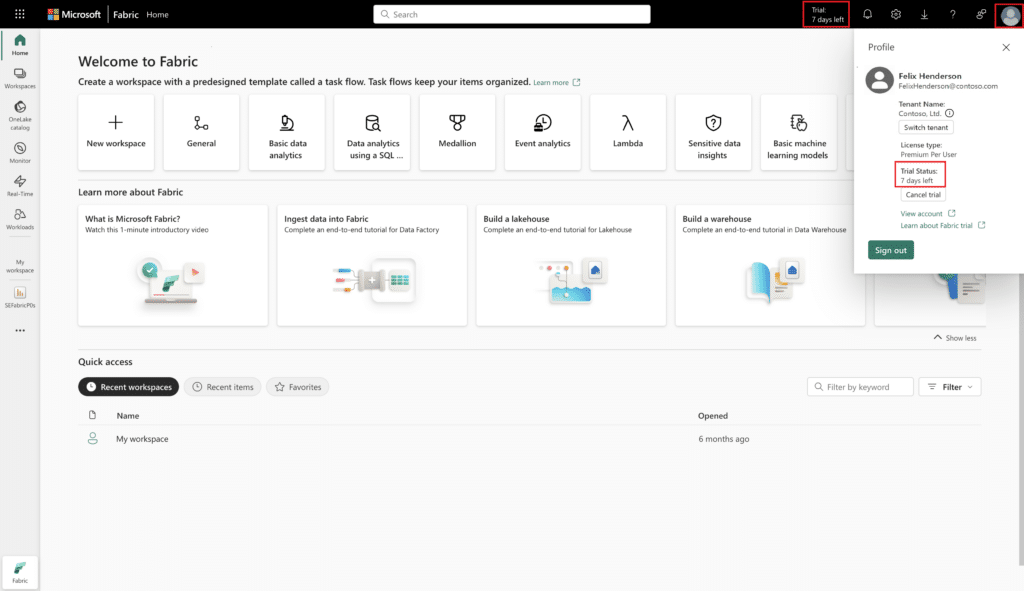
Microsoft Fabric test capacity refers to the trial or evaluation capacity provided by Microsoft for learning, testing, and proof-of-concept scenarios.
Purpose of Test Capacity
- Evaluate Fabric features
- Build demos or prototypes
- Train teams
- Validate architecture decisions
Limitations of Test Capacity
- Fixed and limited CU allocation
- Not intended for production workloads
- Subject to stricter throttling
- Temporary availability
Test capacity is ideal for experimentation but should never be used to estimate long-term production performance without proper scaling analysis.
How to Estimate Microsoft Fabric Capacity
Estimating Microsoft Fabric capacity correctly is one of the most important steps for professional teams. Underestimating capacity leads to slow performance, while overestimating increases cost. Capacity selection typically depends on workload type, concurrency, and data volume, which are explained in more detail in Which Fabric capacity do I need?.
Step-by-Step Capacity Estimation Approach
1. Identify Workloads
List all expected workloads:
- Power BI report refreshes
- Data ingestion pipelines
- Spark notebooks
- SQL warehouse queries
Each workload consumes capacity differently.
2. Estimate Concurrency
Determine how many workloads will run at the same time. For example:
- Multiple report users
- Scheduled pipelines overlapping with business hours
- Data science jobs running in parallel
Concurrency has a direct impact on capacity needs.
3. Measure Data Volume and Frequency
Ask key questions:
- How large are datasets?
- How often does data refresh?
- Are transformations complex?
Higher data volumes and frequent refreshes increase capacity usage.
4. Start Small and Monitor
Most professionals start with a moderate Fabric capacity, then:
- Monitor usage metrics
- Analyze peak consumption
- Adjust capacity size as usage grows
Microsoft Fabric provides built-in monitoring tools that show CU consumption by workload, making optimization easier over time.
Microsoft Fabric Capacity vs Traditional Power BI Capacity
FeatureMicrosoft Fabric CapacityTraditional Power BI CapacityCompute modelUnified across workloadsBI-focused onlySupported workloadsBI, Engineering, Science, WarehousingPrimarily BIScalabilityHigh and elasticLimitedCost optimizationCentralizedFragmentedProfessional useEnterprise analytics platformsReporting-centric
For modern analytics teams, Microsoft Fabric capacity offers far greater flexibility and long-term value.
Best Practices for Managing Microsoft Fabric Capacity
Professionals managing Fabric at scale should follow these best practices:
- Schedule heavy workloads outside business hours
- Optimize Power BI models to reduce refresh cost
- Monitor CU spikes regularly
- Separate test and production capacities
- Educate users on efficient query design
Following these practices ensures consistent performance and predictable costs.
Frequently Asked Questions (FAQs)
1. What is Microsoft Fabric capacity used for? Microsoft Fabric capacity provides shared compute resources for analytics, BI, data engineering, and AI workloads within the Fabric platform.
2. Is Microsoft Fabric capacity required for Power BI? Yes. Power BI workloads in Fabric consume capacity units, especially for enterprise and premium features.
3. What is Microsoft Fabric test capacity best for? Test capacity is best for learning, experimentation, proof-of-concept projects, and early-stage validation.
4. Can I upgrade Microsoft Fabric capacity later? Yes. Capacity can be scaled up or adjusted as workload demands increase.
5. How do I monitor Microsoft Fabric capacity usage? Fabric includes built-in monitoring tools that show CU usage by workload and time period.
6. Is Microsoft Fabric capacity cost-effective for professionals? Yes. The unified capacity model reduces overhead and enables better cost optimization compared to managing multiple platforms.
Microsoft Fabric capacity is the foundation of modern analytics workloads. For professionals, understanding what Microsoft Fabric capacity is, how test capacity works, and how to estimate capacity accurately is essential for performance, scalability, and cost control.
By starting with test capacity, monitoring usage, and scaling strategically, organizations can unlock the full power of Microsoft Fabric while maintaining governance and efficiency.

