
External analytics is now a board-level topic. Customers and partners want live dashboards, not PDFs or screenshots.
But when most BI leaders first attempt Power BI external sharing, they hit the same wall—guest accounts.
If you’ve ever struggled with Entra B2B approvals, license confusion, or identity sprawl, you’re not alone.
There’s now a clean, scalable alternative that avoids Microsoft 365 accounts altogether:
Power BI Embedded (app-owns-data) inside a white-label portal such as DataTako.
Let’s break down why this model has become the new standard for external analytics in 2025.
The external sharing landscape (2025)
Two Official Paths: Entra B2B Guest Accounts vs. Power BI Embedded (App-Owns-Data)
When you need to share Power BI reports outside your company, you can take one of two roads:
Microsoft Entra B2B Guest Users
- External viewers are invited into your tenant as guest identities.
- They access content directly in app.powerbi.com.
- Governance, MFA, and compliance are managed in your tenant.
Power BI Embedded (App-Owns-Data)
- A service principal (app identity) connects to Power BI, not the end user.
- Your application authenticates end-users through your own IdP (Okta, Auth0, Azure AD, etc.).
- Users never need a Microsoft 365 or Power BI license.
What “Viewer without M365 account” actually means
In the app-owns-data model, Power BI acts as your secure rendering engine.
Your viewers authenticate to your system, and Power BI simply returns the visual layer.
There are no guest objects in your Entra directory, only clean app-to-service communication.
That’s the foundation of Power BI external sharing without guest accounts.
Why do teams want to avoid guest accounts
For customer-facing scenarios, guest accounts create more trouble than they solve.
Identity Sprawl & Lifecycle Headaches
Every client user = one guest identity in your tenant.
Now multiply that by 500 clients—thousands of users to review, expire, and deprovision.
It also means:
- Governance reviews before every invite.
- Directory clutter and compliance overhead.
- Constant password resets and tenant-switch confusion.
Governance approvals & practical limitations
Even when you get approval to enable B2B sharing, guests hit friction:
- They can’t easily reshare or export content.
- They often need Pro or PPU licenses.
- Security teams disable cross-tenant sharing.
- Switching between directories in Power BI Service is confusing.
For portals serving hundreds of partners or customers, guest sharing simply doesn’t scale.
How App-Owns-Data works (in plain English)
Picture this
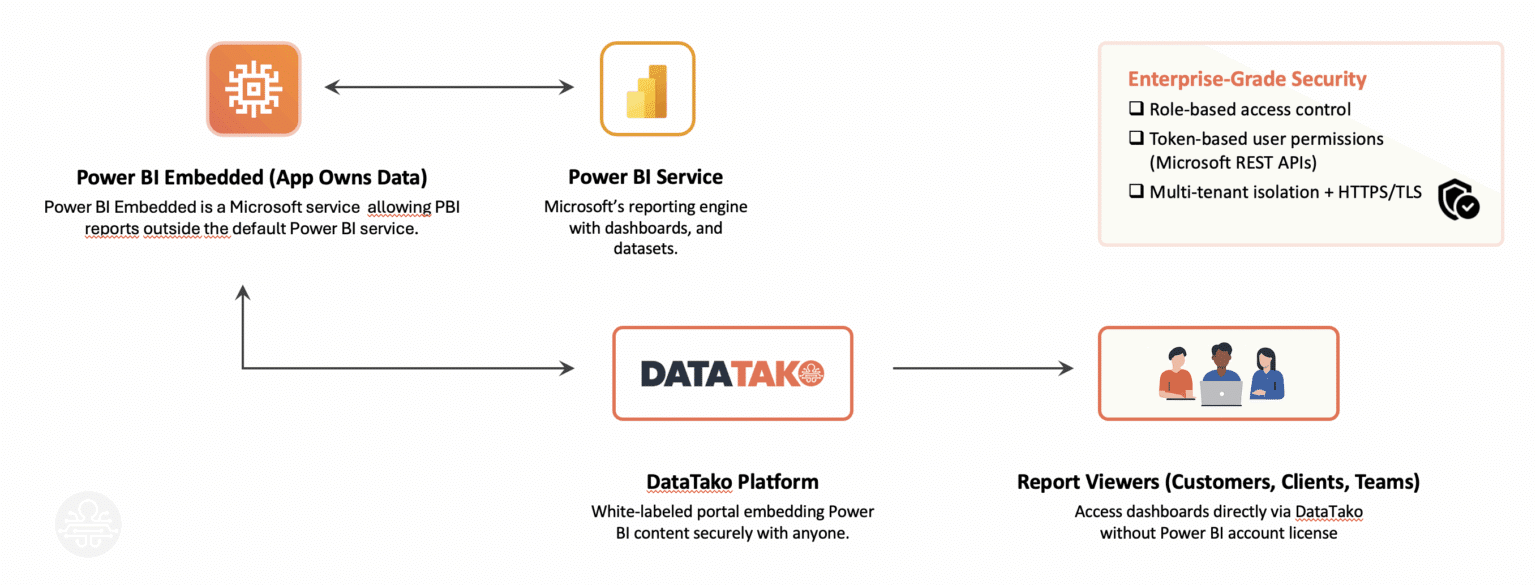
The viewer never talks directly to Power BI; your app does.
Licensing: Capacity vs. User
For app-owns-data you need dedicated capacity (A/EM/F SKU) instead of individual licenses.
ModelLicensing BasisTypical Use CaseUser-Owns-DataPer-User (Pro/PPU)Internal teamsApp-Owns-DataCapacity (A/EM/F)External customers/partners or larger internal teams
Capacity lets you serve unlimited viewers, perfect for SaaS or multi-tenant analytics.
Real-world scenarios
B2B SaaS platform
A SaaS startup shares BI dashboards with 500+ clients. Each client sees only its own data via RLS.
No guest users, no licenses—just instant access inside their app.
Supplier portal
A global manufacturer publishes OTIF and inventory dashboards for partners.
Partners log in with their corporate SSO; Power BI renders securely behind the scenes.
Agency analytics
A marketing agency provides clients with campaign dashboards under each brand.
Each dashboard loads in a custom-branded portal—fully white-labelled.
The simple path: DataTako
DataTako is the turnkey way to implement Power BI external sharing without guest accounts.
You can build a white-label Power BI portal on top of your existing Power BI workspaces—no code required.
Key Capabilities:
- Multi-tenant / RLS mapping
- Custom branding & domains
- Role-based access control
- Email subscriptions & usage analytics
Outcome:
External viewers never need Microsoft 365 or Power BI licenses.
You go live in days with full governance and auditability.
🔗 Try a demo at DataTako.com and see Power BI Embedded in action.